[About] Channel
Press [About] or open [About] [Tab 29] and select a channel. The following contextual tabs of information about the selected channel will be displayed.
{Current Values}
This tab shows a table of the selected channel's current parameter values, organized into the following columns:
- Parameter - one of the selected channel's parameters, as defined by its fixture profile in Patch [Tab 12].
- Source - the data source of the value.
- Value - the parameter value.
- Abs - the value in absolute terms.
- DMX - the DMX level from 0–255 that corresponds with the value. For example, a value of 20% is equivalent to a DMX value of 51.
- Delay - any delay applied to the parameter.
- Time - any timing applied to the parameter.
- Curve - any curve applied to the parameter.
The following information about the selected channel is also available:
- Prev Int Move - the cue number containing the most recent intensity move for the selection.
- Next Int Move - the next intensity move.
- Intensity Inhibited by - what is inhibiting the intensity of the selection, if anything.
- Keywords
- Notes
{Background}
This tab shows a table of the selected channel's parameter background values and sources, organized into the following columns:
| Parameter | Source | Background |
|---|---|---|
| One of the selected channel's parameters, as defined by its fixture profile in Patch [Tab 12]. | The data source of the value. | The parameter background value. If the current control source is removed, the parameter will go to this value. |
- Parameter - one of the selected channel's parameters, as defined by its fixture profile in Patch [Tab 12].
- Source - the data source of the value.
- Background - the parameter background value. If the current control source is removed, the parameter will go to this value.
Background data follows the standard Eos color-coding scheme.
{Moves}
This tab shows a table of the selected channel's parameter move values, organized into the following columns:
- Parameter - one of the selected channel's parameters, as defined by its fixture profile in Patch [Tab 12].
- Prev Move - the most recent move instruction for the parameter.
- Value - the value of the most recent move instruction.
- Next Move - the next move instruction for the parameter.
- Value - the value of the next move instruction.
- Background - the parameter background value. If the current control source is removed, the parameter will go to this value.
{Usage}
This tab shows a table of places the selected channel is used, organized into the following columns:
- Submasters - any Submasters containing the selected channel.
- Cue Moves - any cues containing moves for the selected channel.
- Cue Dark Moves - any cues containing dark moves for the selected channel.
- Active in Cue - any cues containing activity from the selected channel, based on intensity level.
- Groups - any Groups containing the selected channel.
{Refresh Usage}
If you select another channel while on this tab, you can use this button to see the information for the new channel.
{Patch}
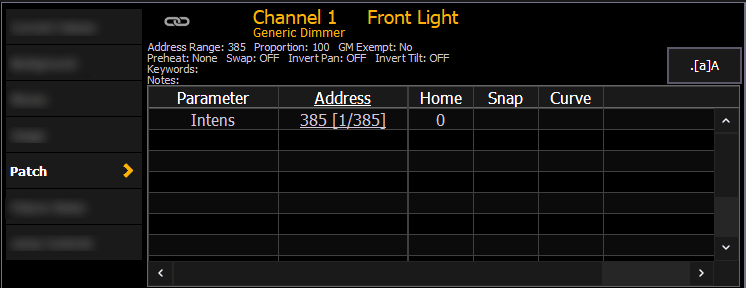
This tab shows a table of the selected channel's Patch information, organized into the following columns:
- Parameter - one of the selected channel's parameters, as defined by its fixture profile in Patch [Tab 12].
- Address - the patched address of the parameter.
- Home - the Home value of the parameter.
- Snap - Snap Parameters display as Enabled in this column. Non-snap parameters are blank.
- Curve - any curve applied to the parameter.
- DMX - the DMX level from 0–255 that corresponds with the parameter.
The following information about the selected channel is also available:
- Address Range - the range of addresses used by the selected channel.
- Proportion - the p
- GM Exempt - wha
- Preheat - the .
- Swap - the
- Invert Pan - the
- Invert Tilt - the
- Keywords
- Notes
This information is also available on the Patch > Attributes tab.
- Address range
- Proportional patch level
- Curve (if any)
- GM exempt
- Preheat information (if any)
- Swap / invert the pan / tilt status
- Keywords
- Notes
- List of all parameter values with their address, home value, snap parameter, DMX value, and parked value (if any)
{Fixture Notes}
This tab shows information found in the fixture library such as:
- Revision Number
- Release Date
- Alternate Names
- Usage Notes
{Lamp Controls}
This tab shows any lamp controls for the selected channel, which can also be opened in Lamp Controls [Tab 31] as a separate display.